
It’s 6:50pm on a Tuesday in July. Your last tech just texted that he’s clear of the Hendersons, and you’re staring at the service board in the driveway with the truck still running. Eleven jobs closed today. Two tune-ups, a capacitor, a condenser fan motor, a no-cool diagnostic, a couple of warranty follow-ups, and one compressor that turned into a same-day repair over a grand. Good day. Phone rang nonstop.
Now here’s the part nobody put on the whiteboard. Of those eleven jobs, maybe four got paid on the spot. The rest are “I’ll mail you a check” or “just send me a bill” or a handwritten ticket sitting in a tech’s door pocket that won’t get keyed into anything until Friday, if you’re lucky. That money is real, you earned it, and it’s not in your account. Multiply that by a full summer and you’ve got a five-figure pile of work you already did and haven’t collected. The phone ringing was never the problem. Getting the money off the truck and into the bank is.
This piece is about plugging that leak. Not the missed calls (we covered where a small shop quietly loses money and the quote follow-up system separately), but the gap between “job complete” and “paid.” It’s the cheapest leak to fix in the whole shop, because you don’t need another lead, another truck, or another tech. You need the invoice to go out the same day and a way for the customer to tap a card from their phone before the tech pulls out of the driveway.
On this page
- What is a same-day invoicing system?
- What unbilled and slow-paid tickets actually cost you
- Why the money gets stuck on the truck
- The 6-stage same-day invoicing and text-to-pay system
- The steal-this message pack
- Run it for three different shops
- Staying legal: texting invoices and payment links
- Objections, answered straight
- Frequently asked questions
What is a same-day invoicing system?
A same-day invoicing system is the fixed workflow that turns a finished HVAC job into a sent invoice with a one-tap payment link before the end of the day it was completed, then automatically chases anything still unpaid on a set schedule until it clears. It’s not your bookkeeper catching up on Friday. It’s close-the-ticket-on-site, price-it-same-day, text-the-link, and let software handle the follow-up, so the money moves while the customer still has your work fresh in their head.
The timing is the whole point. A homeowner who just watched your tech fix their AC in a heat wave is at peak willingness to pay. They’re grateful, they’re relieved, and they’ve got their phone in their hand. Wait two weeks and mail them a paper invoice and that same person is annoyed, has forgotten which line item was which, and files it under “deal with later.” You didn’t change the price. You changed how hard it is to pay, and how good they felt while paying.
Underneath, the system does three jobs. It captures the charge accurately at the job site so nothing gets lost or mis-keyed. It presents the bill the way your customer actually wants to pay, which in 2026 means a tap on a phone, not a check in the mail. And it follows up on the ones who don’t pay right away without anyone in your office having to remember to do it. Get those three right and your days-to-cash drops from two weeks to two days on most tickets, with zero new marketing spend.
What unbilled and slow-paid tickets actually cost you
Run the numbers on your own board and it stings. Say you do $1.8 million a year, a solid number for a mid-size residential shop. Industry data pegs the typical collection lag for electrical, plumbing, and HVAC contractors around 57 days of sales outstanding historically (Sageworks, via Levelset), and even newer home-service data shows a median of 13 days with a long tail past 30 (Tofu). Shave your average collection time from 20 days to 3 and you’ve pulled roughly two and a half weeks of revenue forward into your account. On $1.8M that’s about $83,000 in cash that’s sitting in your bank instead of your customers’.
That cash-flow gap isn’t free money you’re lending out, either. It’s money you’re often borrowing to cover. When the customer hasn’t paid but your supply house wants paying, the gap gets filled by a line of credit, a maxed card, or a slow-pay to your own vendors that costs you early-pay discounts. The slower you collect, the more of your own margin you hand to a lender just to keep trucks moving. On top of that sits the time: every uncollected ticket becomes a phone call, a re-sent bill, and a trip to the bank, which is your office manager’s week spent chasing money you already earned.
Why the money gets stuck on the truck
You can’t fix the leak until you know where it springs. In residential HVAC, uncollected and slow-paid tickets almost always come from one of three places, and only one of them is the customer’s fault.
Reason one: the invoice never goes out same day. The tech closes the job, scribbles the parts and hours on a paper ticket or leaves a note in his head, and it doesn’t get turned into a real invoice until someone at the office keys it in. On a busy summer week that backlog grows faster than anyone clears it, so a job done Tuesday gets billed the following Monday. Six days gone before the customer even sees a number. The job wasn’t slow to pay. It was slow to bill.
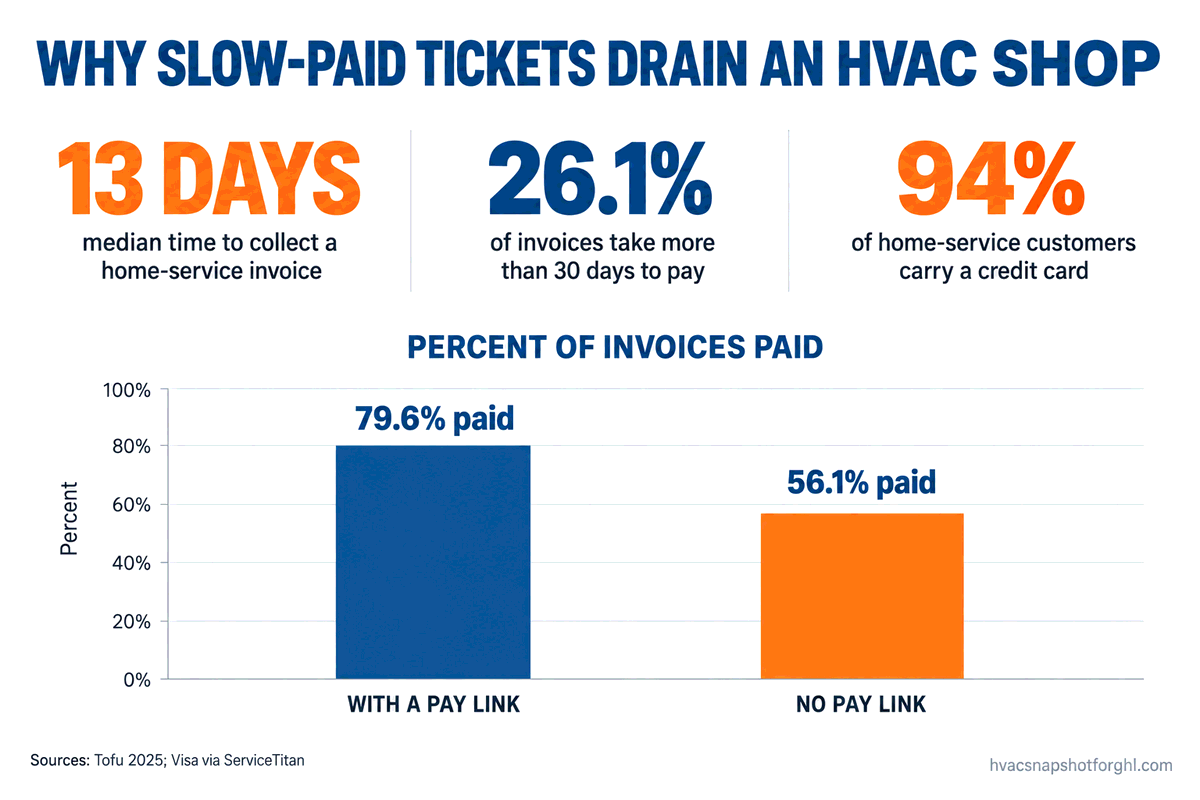
Reason two: you’re asking people to pay the hard way. You hand them a paper invoice and a “mail a check or call the office with a card.” Checks are dying, card payments climbed from 27% to 37% of home-service jobs, and 94% of your customers are carrying a credit card right now (Visa data, via ServiceTitan). When the easiest option you offer is the one almost nobody uses anymore, you’ve built friction into your own cash flow. The payment-link data makes this concrete: a tap-to-pay link lifted the paid rate from 56.1% to 79.6% (Tofu).
Reason three: nobody follows up on the stragglers. Some customers genuinely need a nudge. The invoice landed in a spam folder, the spouse who handles bills was traveling, or it slipped behind a pile of mail. Without a follow-up system, the only way these get collected is if someone remembers to chase them, and on a busy shop that someone doesn’t exist. So the ticket ages from 15 days to 45 to “write it off,” and a job you did well turns into a loss because of silence after the fact.
The 6-stage same-day invoicing and text-to-pay system
Here’s the full workflow. Six stages from the moment the tech wraps the job to the money landing in your account, each with what to set up, the real copy you can steal, and the part nobody else writes down: how it breaks and what to do about it. Every automated touch stops the instant the invoice is paid.
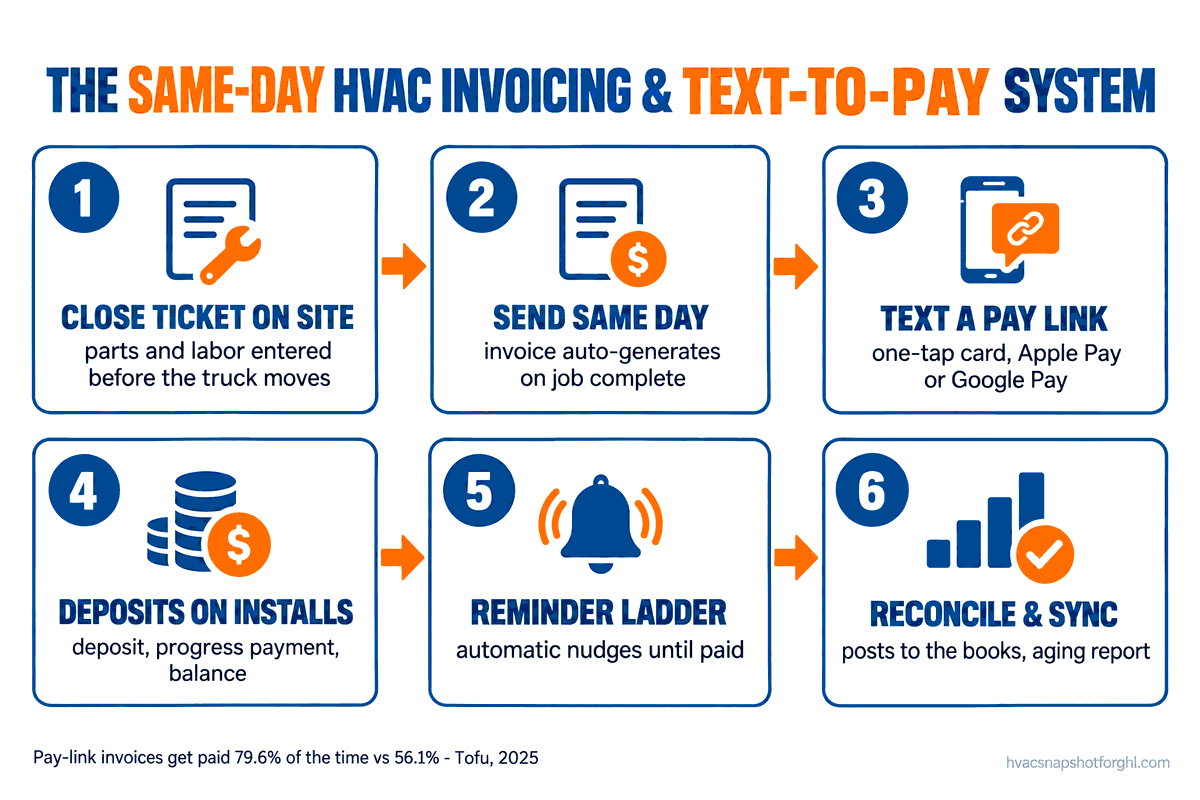
Stage 1: Close the ticket on site, before the truck moves
The money leak starts the second a tech leaves a job without the charge captured. So the first stage is non-negotiable: the ticket gets finalized at the curb. Parts used, labor time, the diagnostic fee, any trip charge, all entered into the invoice on the tech’s phone or tablet while he’s still in the driveway. Not remembered, not scribbled, entered. The customer sees the total and agrees to it face to face, which kills the “that’s not what we discussed” dispute before it can happen.
How it breaks: the tech is in a hurry to get to the next call and figures he’ll “finish it later.” Later is where tickets die. Fix it by making the close-out a required step your dispatch won’t let him skip, and by keeping the mobile invoice dead simple, flat-rate line items he taps, not a form he has to type. If closing a ticket takes 90 seconds, it gets done. If it takes ten minutes, it gets skipped.
Stage 2: Price it and send it the same day, not Friday
Once the ticket is closed it becomes an invoice and goes out immediately. This is the stage most shops lose. The job is done, the charge is captured, and then the invoice sits in a queue waiting for someone to “process billing” at the end of the week. Every day it waits, you’ve seen the data, pushes your collection date out and drops the odds it ever gets paid in full. Same-day send isn’t a nice-to-have, it’s the difference between a median of 8 days to cash and 15 (Tofu).
How it breaks: billing is bottlenecked on one person who batches it. The fix is to detach sending from that person entirely. When the tech marks the job complete, the invoice generates and sends on its own to the email and mobile number on file. Your office manager reviews exceptions, the weird warranty split or the commercial net-30 account, not every routine repair. Default to automatic, handle the edge cases by hand.
Stage 3: Text the invoice with a one-tap pay link
Email alone is not enough. Email gets buried; text gets read. The invoice should land as a text message with a short line and a secure link that opens the bill and a Pay Now button that takes a card, Apple Pay, or Google Pay in one tap. No login, no app, no calling the office. This single change is the biggest lever in the whole system, the jump from 56.1% to 79.6% paid (Tofu), and one-tap wallets like Apple Pay get people paying roughly three times faster than a typed card entry (Stripe).
The copy:
Hi Linda, it’s Marcus with Ace Comfort. Thanks for having us out today. Your invoice for the condenser fan motor is ready, $486 total. You can view it and pay securely right here: [link]. Any questions, just reply to this text. Thanks again!
How it breaks: the link points to a clunky payment page that asks the customer to create an account, or the text comes from a number they can’t reply to, so a quick question becomes a reason to stall. Fix it with a true one-tap page and a conversational number the customer can text back on. The goal is zero friction between “I’ll pay that” and “paid.”
Stage 4: Collect deposits and progress payments on the big jobs
Repairs you collect in full on site. Installs are different, and this is where real money sits. A system changeout averages $7,500 and often runs past $10,000 (Angi), and you shouldn’t be fronting equipment cost for weeks. Build a billing schedule into the job: a deposit to lock the install and order equipment, a progress payment when the gear is delivered or the install starts, and the balance on completion, each one a tap-to-pay link sent at the right trigger. For homeowners who can’t swing it from checking, and more than half can’t cover a surprise $1,000 bill from savings (Bankrate), you pair this with consumer financing so the price lands as a monthly payment instead of a wall.
How it breaks: you let an install go in on a handshake with “we’ll settle up at the end,” and the end turns into a 45-day collection fight on a $9,000 job. Fix it with a written billing schedule the customer agrees to when they sign, and deposit and progress links that fire automatically at each stage. The deposit isn’t you being pushy. It’s standard in every trade that touches real equipment, and it protects both sides.
Stage 5: The automated reminder ladder for the ones who don’t pay
Some invoices won’t clear on the first text, and that’s normal. The reminder ladder handles them without anyone lifting a finger. A gentle nudge a day or two out, a firmer one at a week, and a “this is now past due, here’s how to clear it” around two weeks, each still carrying the one-tap link so paying stays a single tap away. The ladder is what rescues the quarter of invoices that otherwise drift past 30 days (Tofu), and it does it in a steady, polite voice instead of an awkward phone call your office dreads making.
The copy (Day 2 nudge):
Hi Linda, just a friendly reminder that your invoice from Ace Comfort for $486 is still open. You can take care of it in a few seconds here: [link]. Already paid? Ignore this and thanks! Reply STOP to opt out of reminders.
How it breaks: the ladder keeps firing after someone paid by check at the door, so a paying customer gets dunning texts and gets rightly annoyed. Fix it by making sure every payment, including the manual ones your tech takes on site, gets marked in the system so the ladder stops. The reminder sequence is only as good as your payment records are current. One un-marked cash payment and you’ve insulted a good customer.
Stage 6: Reconcile, hand off clean, and watch the aging report
The last stage is the one that keeps the whole thing honest. Payments sync to your books so you’re not re-keying deposits into QuickBooks by hand, which is both a time sink and a place errors breed. Your deposit batches match what the processor actually settled. And you get an aging report, a simple list of what’s still open and how old it is, so the handful of genuinely stuck invoices get a human call while they’re still collectable, not after they’ve aged into a write-off. If your GoHighLevel or CRM isn’t syncing cleanly to your accounting, you end up with a half-connected system that quietly costs you in reconciliation hours and missed collections.
How it breaks: payments live in three places, the card processor, the CRM, and QuickBooks, and none agree, so your bookkeeper spends a day a month untangling it and still can’t trust the aging report. Fix it with one connected flow where a payment posts once and flows everywhere. The aging report is only useful if it’s accurate.
The steal-this message pack
Everything above in one place, ready to drop into your CRM today. Swap the names, numbers, and shop name for yours.
Notice what the pack is not: six versions of “you owe us money.” Each message makes paying easier, not guiltier, and the link does the work. The reason a system beats a person here is the same reason it beats a person on quote follow-up, it never forgets, never feels awkward, and never gets too busy in July to send the nudge that collects a $500 ticket.
Run it for three different shops
The workflow is identical; who owns it and what you automate first changes with the size of the shop. Here’s how the same system plays out across a solo operator, a five-truck shop, and a twelve-truck outfit.
| Solo / 1-2 trucks | 5-truck shop | 12-truck shop | |
|---|---|---|---|
| Who owns collection | You, from the truck | Office manager + automation | AR coordinator + automation |
| Biggest risk | Tickets never get billed | Billing bottlenecked on one person | Invoices lost in volume, no aging discipline |
| Automate first | Same-day send + pay link | Full send + reminder ladder | Ladder + deposits + aging report |
| The live call (past-due) | You, batched weekly | Office manager | Coordinator, tracked on a board |
| Win to expect | Stop forgetting to bill | Days-to-cash from ~15 to ~3 | Measurable drop in 30+ day AR |
Solo operator. You are the office, so billing competes with wrench time and loses, which means half your tickets get billed late or not at all. Automate the two things that need zero judgment, same-day send and the tap-to-pay link, so every completed job invoices itself. Even that half-built version beats your current system, which is a shoebox of tickets you’ll “get to this weekend.”
Five-truck shop. Here the killer is the billing bottleneck, one person keying every invoice while jobs pile up. Detach sending from that person: invoices fire automatically on job complete, the reminder ladder runs itself, and your office manager works exceptions and past-dues instead of routine billing. This is the size where days-to-cash drops the most dramatically, often from two weeks to a few days.
Twelve-truck shop. At this volume individual invoices get lost and nobody owns the aging report, so slow-pays rot quietly. You need deposits and progress billing wired into every install, a reminder ladder that never sleeps, and a coordinator whose job is the aging report, calling the genuinely stuck accounts while they’re still collectable. Now your 30-plus-day AR is a number on a dashboard you can actually manage down.
Staying legal: texting invoices and payment links
Texting a customer an invoice for work they asked you to do is about the safest SMS there is, a transactional message to someone you have an existing business relationship with. But the rules still bind you, so keep two things straight.
First, consent and TCPA. The Telephone Consumer Protection Act governs business texting. When a customer books a job and hands over their mobile number, you have consent to text them about that job, including the invoice. Log it with a timestamp, keep the opt-out working, and honor a STOP instantly, even on billing texts. Our plain-English TCPA and 10DLC guide for HVAC walks the full checklist, and the quote follow-up system covers the marketing side.
Second, A2P 10DLC registration. To send business texts from a regular 10-digit number, carriers make you register your brand and campaign. Illustrative 2026 figures: a one-time brand registration around $4.50 for a sole proprietor or low-volume shop (higher for high-volume), a recurring campaign fee commonly $2 to $10 per month, and a carrier surcharge of roughly $0.003 per message (GoHighLevel A2P fee schedule). Pennies against the cash you’re collecting faster, but skip registration and carriers filter your texts, so your invoice never arrives and you never know why.
Objections, answered straight
“My customers like paying by check, this is overkill.” Some do, and you keep taking checks, nobody’s banning paper. But the data says the check customer is now the minority and shrinking fast, from 59% of home-service spending down to 36% in under a decade (Visa, via ServiceTitan). You’re not replacing checks, you’re adding the option 94% of your customers are already carrying in their pocket. The ones who want to tap and be done now can, and they pay faster.
“Card processing fees eat my margin.” They cost something, usually 2.6% to 3%, so about $13 on a $486 repair. Weigh that against the alternative: the same invoice unpaid for 15 instead of 8 days and a one-in-five chance it’s never collected in full. A small percentage on money collected today beats 100% of money you never see. Many shops also pass a surcharge or offer a small cash discount where state law allows.
“Do I need to be technical to set this up?” No, but somebody builds it once, that’s the honest catch. The logic, close on site, auto-send, pay link, reminder ladder, stop on paid, sync to books, is straightforward, but wiring it through a CRM, a payment processor, and your accounting takes a few focused hours if you know the tools. That’s exactly why done-for-you systems exist: the workflow comes pre-built and you plug in your shop name, your processor, and your reminder timing.
“I already pay for field-service software, doesn’t it do this?” Most platforms can store an invoice and take a card. What many shops never turn on is the full chain, automatic same-day send, a true one-tap text link, a branching reminder ladder that stops on payment, deposits wired into installs, and clean two-way sync to the books. The capability often sits unused because nobody set the sequence up. If you’re weighing what all this costs, our HVAC software pricing teardown and ServiceTitan alternatives breakdown lay out the real numbers.
Frequently asked questions
How fast should an HVAC shop send an invoice after the job?
The same day the job is completed, ideally before the tech leaves the driveway. Home-service data shows invoices sent with a tap-to-pay link are paid in a median of 8 days versus 15 without, and every day an invoice waits to be sent pushes your collection date out further. Close the ticket on site and let the invoice generate and send automatically on job complete.
What is text-to-pay for contractors?
Text-to-pay sends the customer their invoice as a text message with a secure link to a page where they can pay in one tap using a card, Apple Pay, or Google Pay, no login, app, or phone call to your office. It works because texts get read almost immediately while emailed invoices get buried, and because 94% of home-service customers already carry a credit card.
Does adding a payment link actually get me paid faster?
Yes, by a wide margin in the data. Across 3.75 million home-service invoices, those carrying an online payment link were paid 79.6% of the time versus 56.1% without one, and in a median of 8 days versus 15. The link removes the friction between a customer deciding to pay and actually paying, which is where most slow invoices stall.
Are credit card processing fees worth it for an HVAC shop?
Usually yes. Processing runs about 2.6% to 3%, roughly $13 on a $486 repair. Against that you get a far higher chance of collecting at all, payment in about half the time, and hours of office staff time saved chasing unpaid bills. Many shops offset the fee with a compliant surcharge or a small cash discount where state law allows.
How do I handle deposits and progress payments on big installs?
Build a billing schedule the customer agrees to at signing: a deposit to lock the job and order equipment, a progress payment at delivery or install start, and the balance on completion, each sent as a one-tap link at the right trigger. This keeps you from fronting five figures of equipment cost for weeks, and pairs well with consumer financing for homeowners who need the price as a monthly payment.
Is it legal to text customers an invoice and payment reminders?
Yes, with consent and the right setup. A customer who books a job and gives you their mobile number has given consent to text them about that job, including the invoice. Keep a logged record, put a working opt-out in every message, honor STOP instantly, and register your number for A2P 10DLC so carriers deliver your texts. Keep past-due language polite and factual.
What happens if a customer pays by check after the reminders start?
Mark the payment in your system the moment it comes in, including cash or checks your tech takes on site, and the automated reminder ladder stops immediately. The most common way a good customer gets annoyed is a dunning text after they already paid, which only happens when a manual payment never got recorded. Keep payment records current and the system polices itself.
It’s 6:50pm on a Tuesday again, and you’re back in the driveway with the service board open. Except now those eleven closed jobs show a different picture. Nine are already marked paid, collected by tap before each tech pulled away. One commercial account is on net-30 as agreed, sitting clean in the aging report. The last one, a homeowner whose wife handles the bills, just got a friendly reminder scheduled for Thursday that you didn’t have to remember to send. The money from today is in your account tonight, not three weeks from now, and nobody spent the evening keying tickets. That’s not a bigger ad budget or another truck. It’s the same work you already did, finally collected the day you did it.